HTML/CSS.
Native desktop UI.
A native HTML/CSS GUI framework with its own renderer, independent of any WebView. Broad support for modern web UI features helps coding agents build interfaces and inspect running apps through DevTools and MCP.
01Modern web layout
Your layout skills.
A native destination.
Use familiar Flex, Grid, selectors, CSS variables, typography and animation. Canvas, SVG and DOM events have dedicated APIs, with individual support details in the reference.
.workspace {
  display: grid;
  grid-template-columns: 202px 1fr;
  gap: 24px;
}
.asset-row {
  display: flex;
  align-items: center;
  height: 54px;
}02Native + Lua
A lean engine. Lua for interaction.
KUI ships its own HTML/CSS renderer, without Chromium or a system WebView. Keep business logic in the native host, and use optional Lua for interface interactions.
local button = document:getElementById("save")
local status = document:getElementById("status")

button:addEventListener("click", function(event)
  status.textContent = "Saved"
end)
Lua event binding. The host must bind the document and execute scripts.
03Built-in virtual components
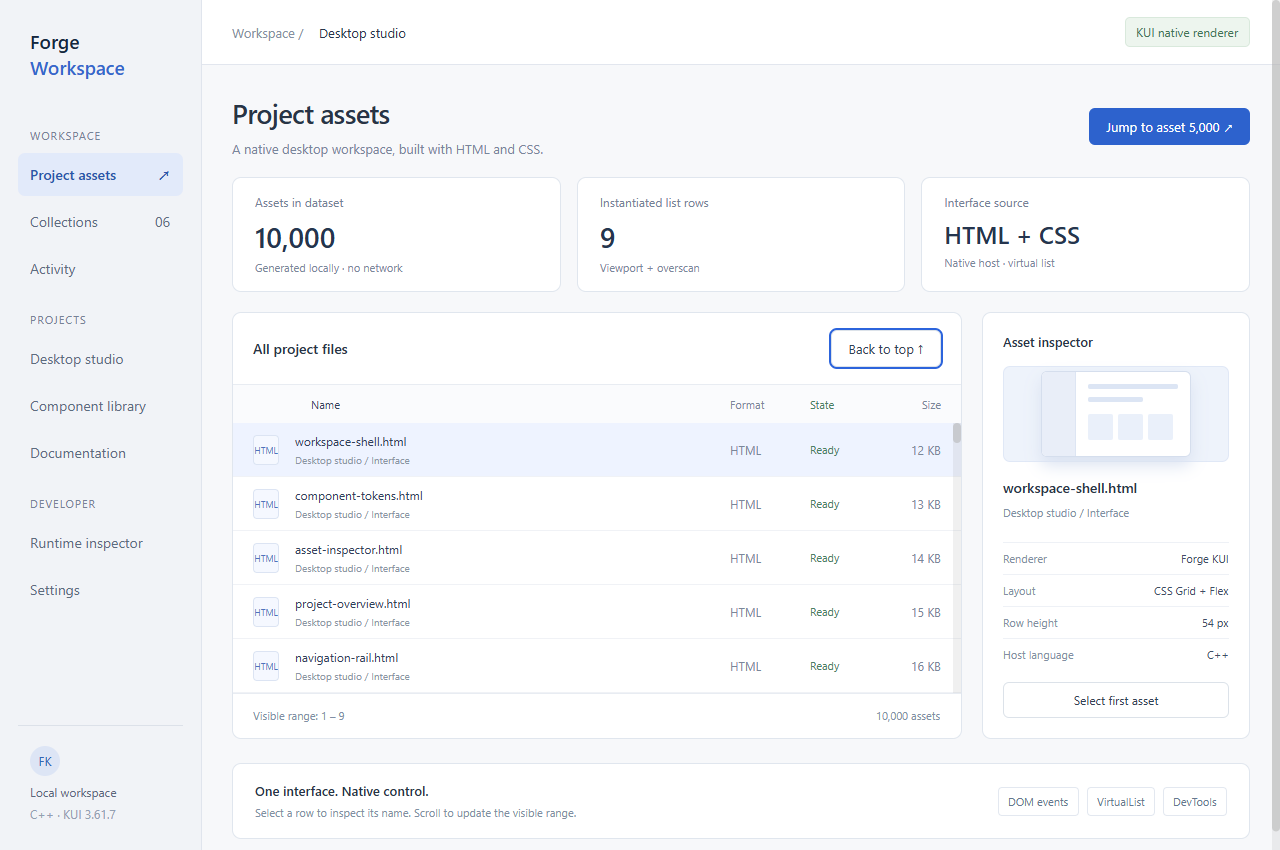
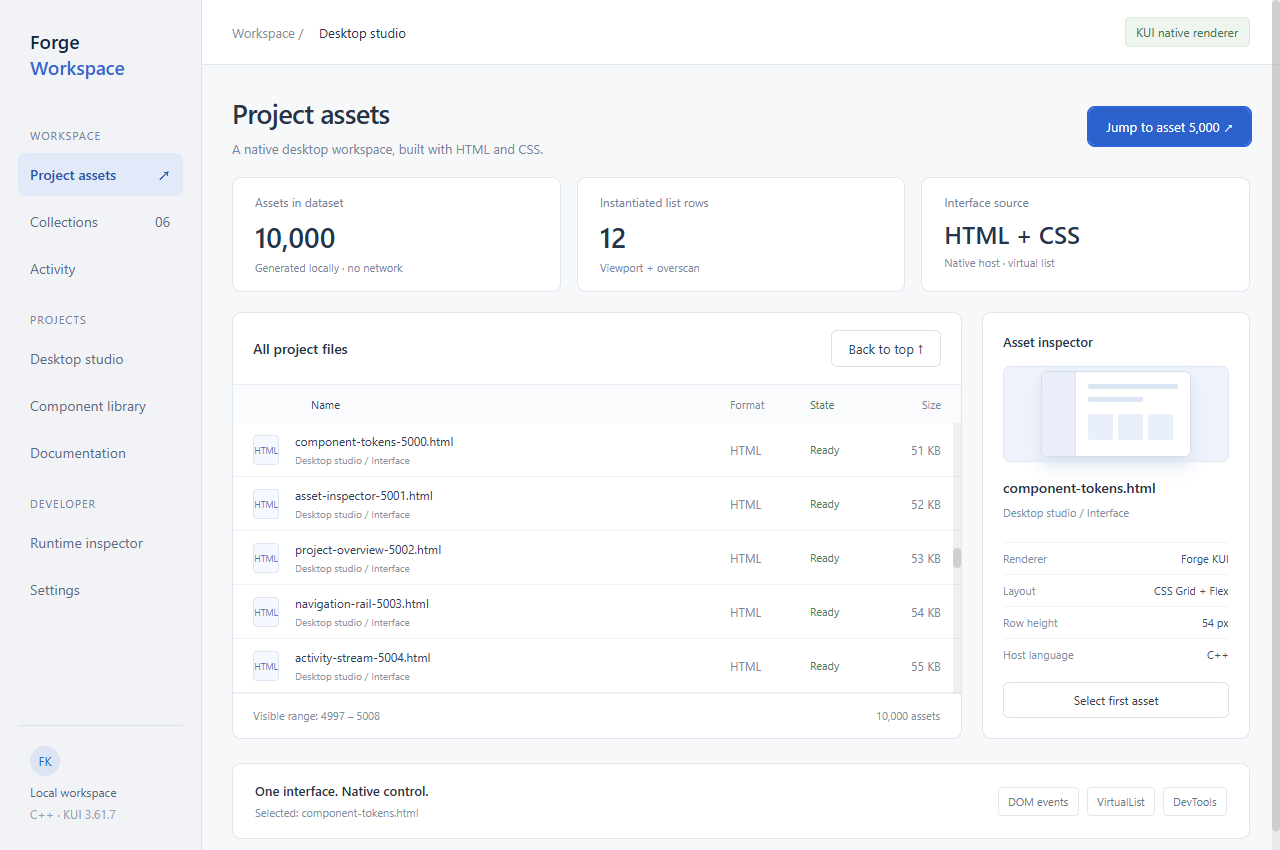
10,000 records.
Only the rows in view.
VirtualList, ListView and TreeView are built in. Instantiate rows for the viewport and overscan, with APIs for selection, tree expansion and dynamic data changes.
Virtualization is part of the framework.
Rows remain DOM elements with regular CSS and events. Keep data in the host, and create interface nodes for the current range.
kui::VirtualList list;
kui::VirtualListConfig rows;
rows.totalItems = 10000;
rows.itemHeight = 54;
rows.overscan = 3;
rows.renderItem = renderAsset;

list.setup(container, rows);
list.scrollToIndex(4999);
10,000 is this example’s dataset, not a performance limit.
04Extension
Build the tools
your application needs.
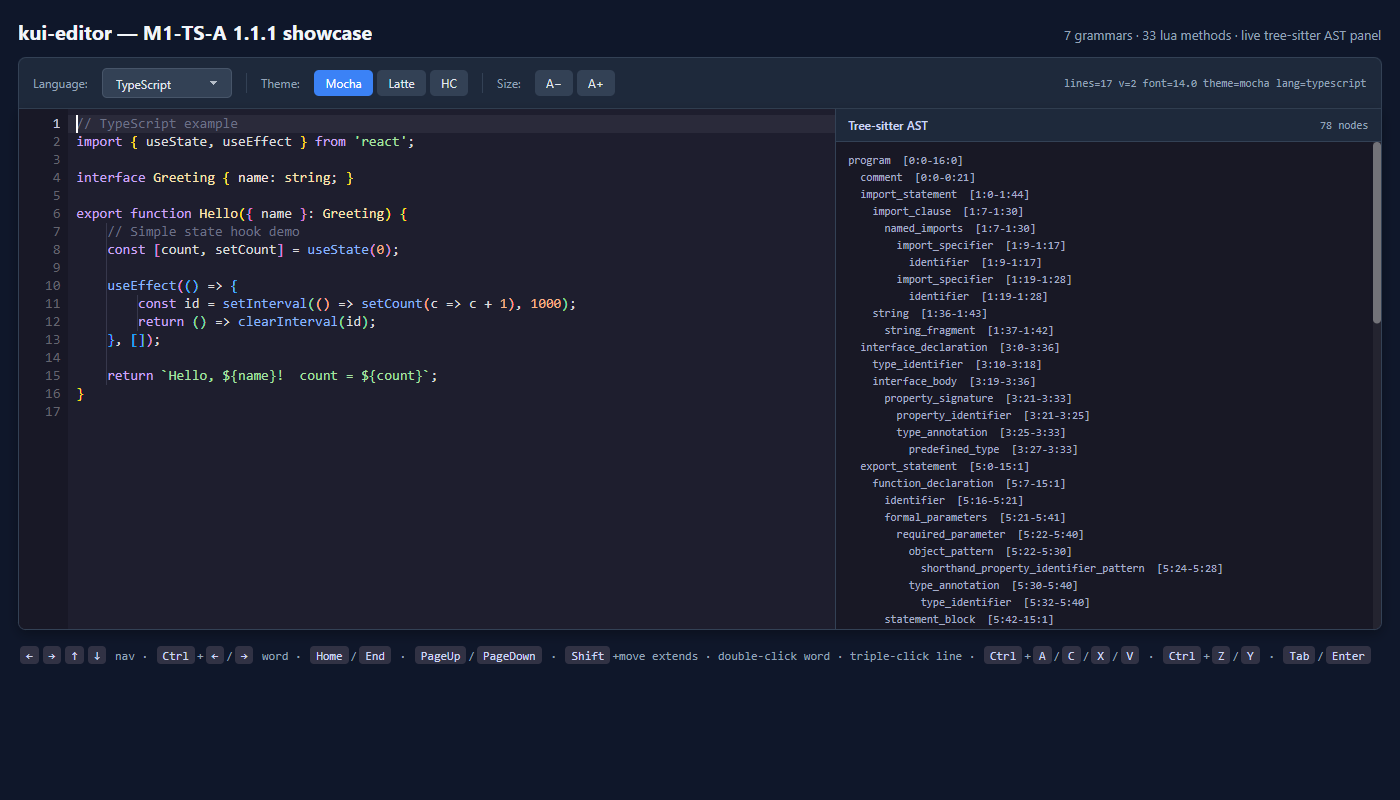
Add an editor, PDF viewer or 3D through standalone extensions. Register your own elements through a pure C ABI, with styling, events and a defined drawing lifecycle.
05DevTools + MCP
Adjust the UI.
Test real interactions.
MCP lets agents inspect and operate a running KUI app. Developers can work directly with DOM, CSS, Lua and performance tools.
01Agent + MCP
Let your agent adjust the UI.
Through MCP, your agent reads the real DOM and coordinates, edits the inspector layout, types a name and clicks Save. Both styles and application feedback are checked.
kui_dom / kui_set_style / kui_clickSet up MCP ↗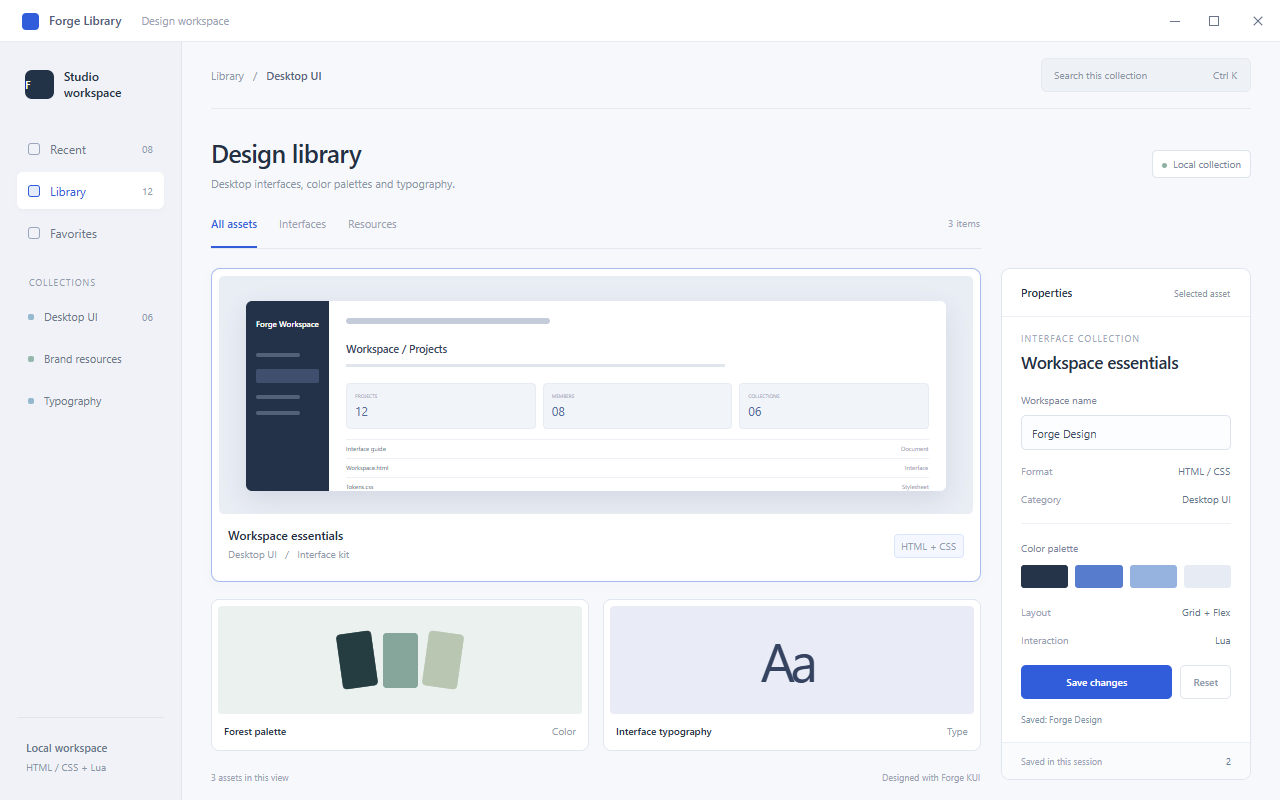
02Elements
Find the element. Inspect the layout.
Inspect the DOM tree, computed styles and element preview together. Read Grid settings, spacing and actual dimensions, edit styles and check the app window.
DOM / Computed / Box ModelDebugging guide ↗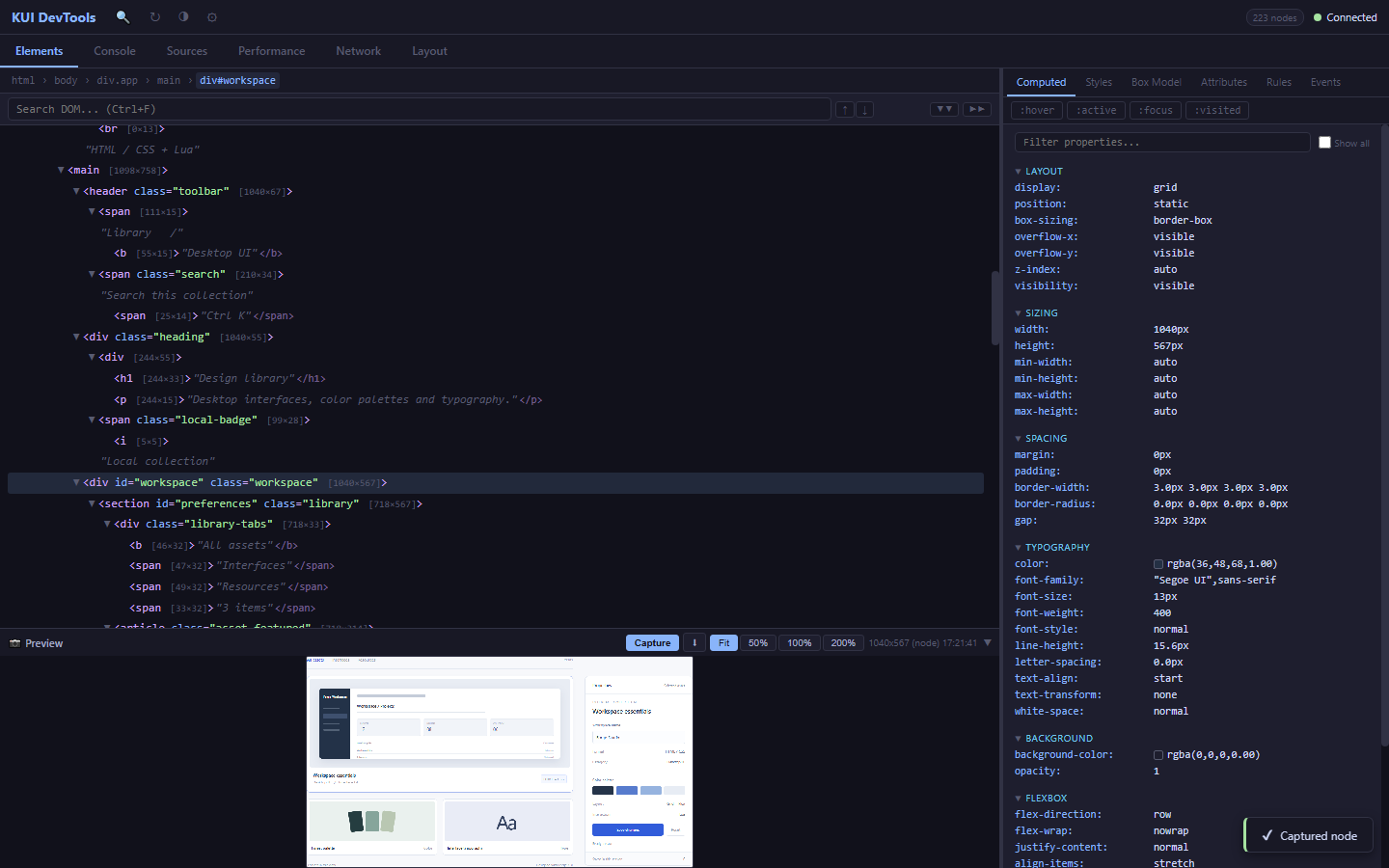
03Sources
Pause on a click. See the state change.
A real save-button callback pauses before updating the counter. Inspect the current line, locals and upvalues, step through execution, inspect the call stack and evaluate expressions.
Breakpoints / Scope / Call StackDebugging guide ↗View the call stack ↗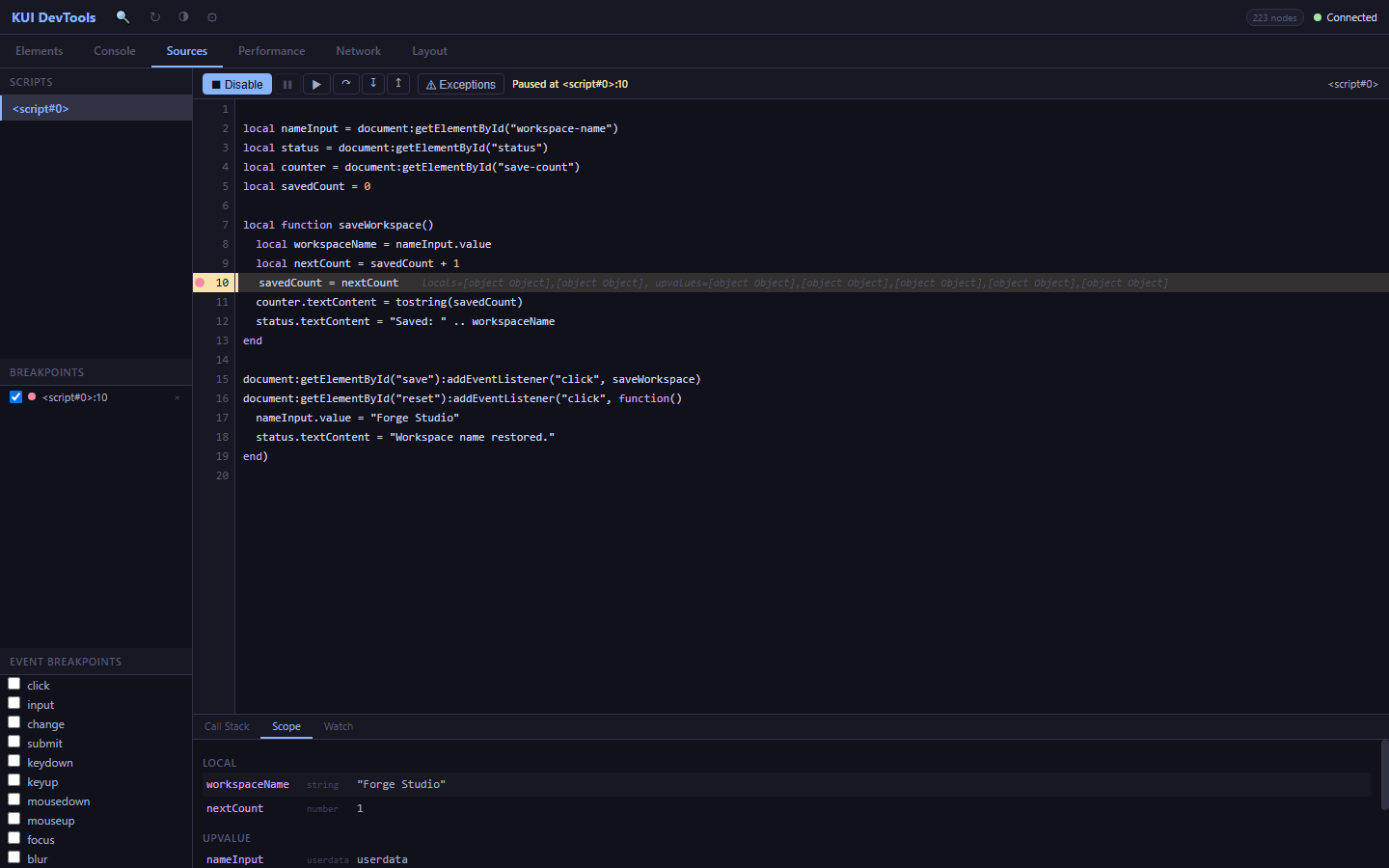
04Performance
Trace the frame. Find the work.
Record an interface change and inspect style, layout, painting and submission frame by frame. Node attribution identifies repeated work; resource sampling adds CPU and memory context.
Frames / Hot Nodes / CPUPerformance guide ↗View the recording overview ↗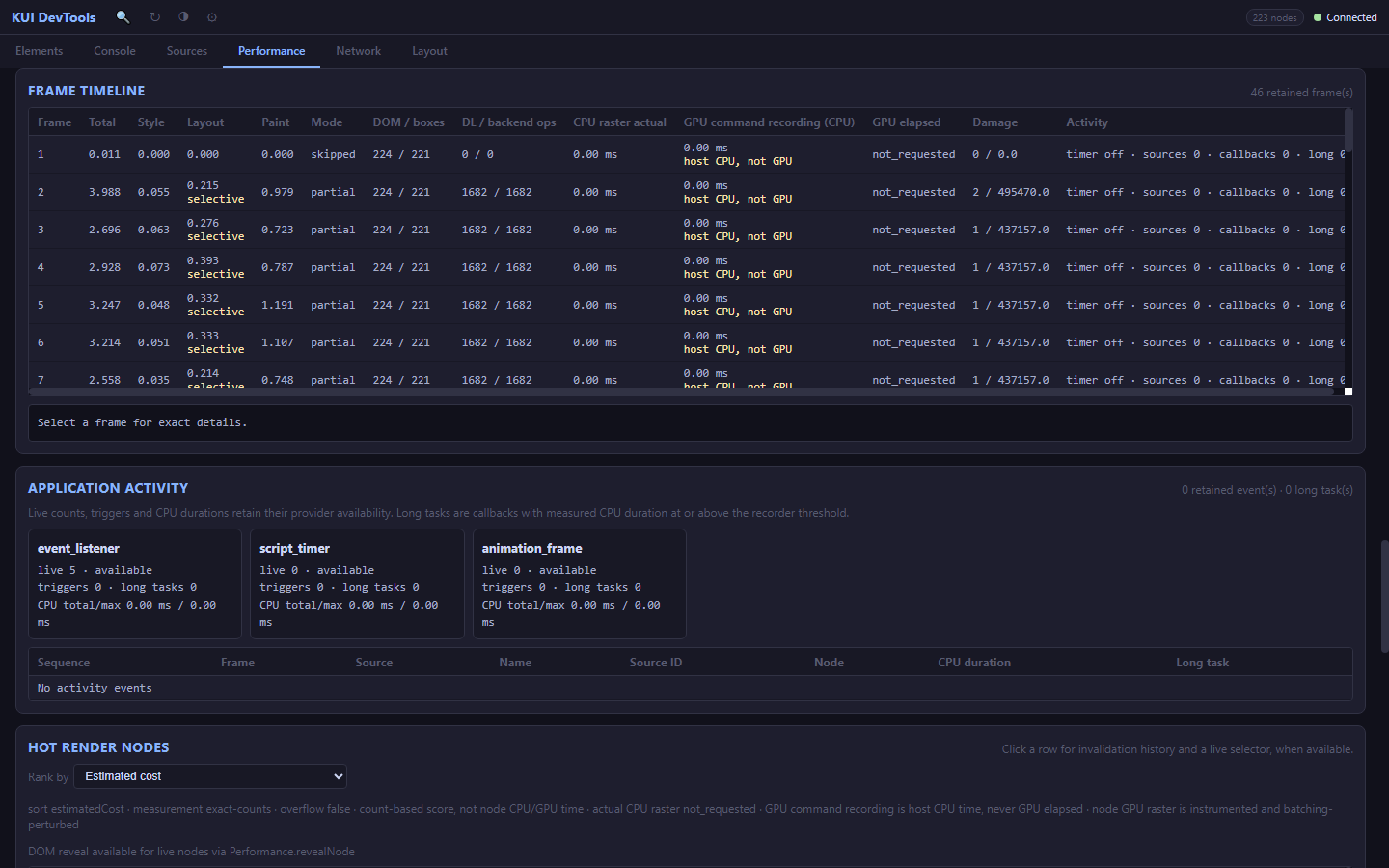
06Built for coding agents
Describe a web UI.
Let your agent handle KUI.
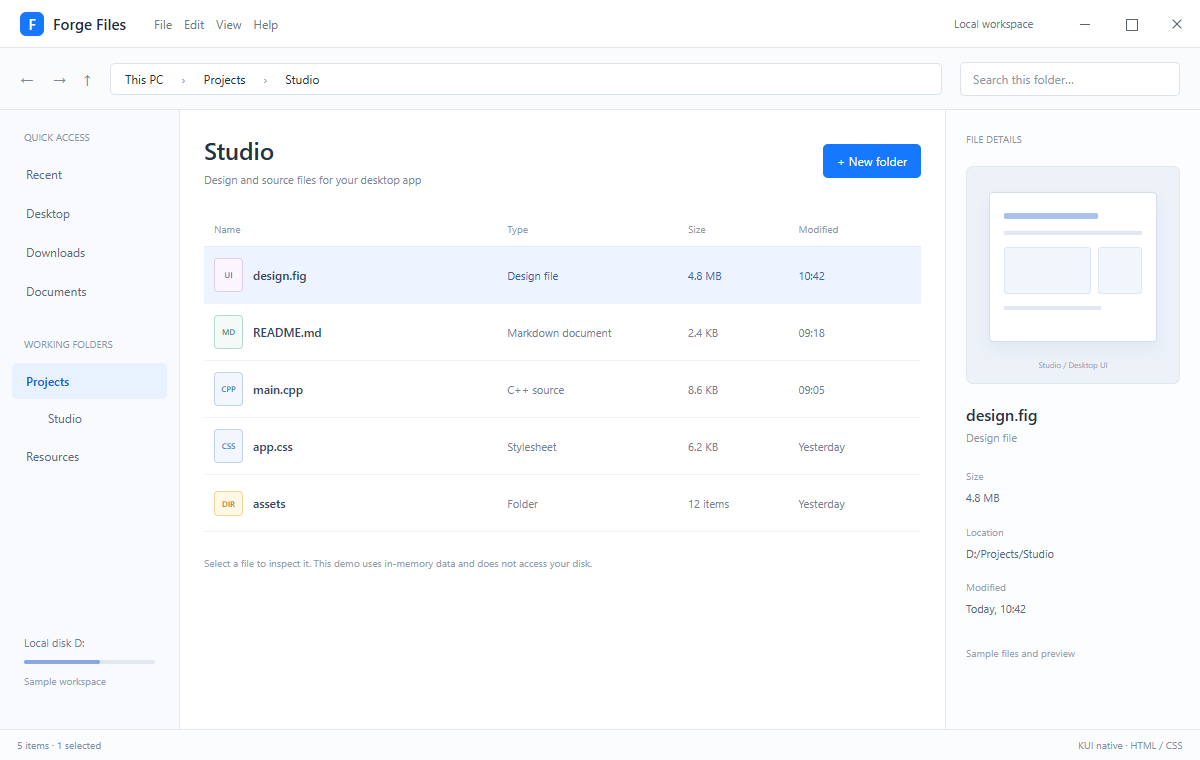
You do not need to learn KUI’s features first. Ask your agent to follow HTML/CSS web standards and describe the layout, style and actions. It can consult the SDK docs, handle native integration and inspect the result through MCP.
<!doctype html>
<html lang="en">
  <head>
    <meta charset="utf-8">
    <title>
      Forge Files
    </title>
    <!-- APP_CSS -->
  </head>
  <body class="ant">
    <div class="desktop-app">
      <header class="app-titlebar">
        <span class="app-brand">
          <span class="app-glyph">
            F
          </span>
          Forge Files
        </span>
        <span class="title-menu">
          File Edit View Help
        </span>
        <span class="local-pill">
          Local workspace
        </span>
        <div class="window-controls" role="group" aria-label="Window controls">
          <button id="window-minimize" class="window-button window-minimize" type="button" aria-label="Minimize" title="Minimize">
            <span class="window-icon icon-minimize" aria-hidden="true">
            </span>
          </button>
          <button id="window-maximize" class="window-button window-maximize" type="button" aria-label="Maximize" title="Maximize">
            <span class="window-icon icon-maximize" aria-hidden="true">
            </span>
          </button>
          <button id="window-close" class="window-button window-close" type="button" aria-label="Close" title="Close">
            <span class="window-icon icon-close" aria-hidden="true">
            </span>
          </button>
        </div>
      </header>
      <div class="files-toolbar">
        <span class="history">
          ← → ↑
        </span>
        <div class="pathbar">
          This PC
          <span>
            ›
          </span>
          Projects
          <span>
            ›
          </span>
          Studio
        </div>
        <span class="search-box">
          Search this folder…
        </span>
      </div>
      <div class="files-workspace">
        <aside class="files-rail">
          <p class="rail-label">
            QUICK ACCESS
          </p>
          <div class="rail-item">
            Recent
          </div>
          <div class="rail-item">
            Desktop
          </div>
          <div class="rail-item">
            Downloads
          </div>
          <div class="rail-item">
            Documents
          </div>
          <p class="rail-label spaced">
            WORKING FOLDERS
          </p>
          <div class="rail-item active">
            Projects
          </div>
          <div class="rail-child">
            Studio
          </div>
          <div class="rail-item">
            Resources
          </div>
          <div class="disk-info">
            <div>
              Local disk D:
            </div>
            <div class="disk-track">
              <i>
              </i>
            </div>
            <span>
              Sample workspace
            </span>
          </div>
        </aside>
        <main class="files-main">
          <div class="files-heading">
            <div>
              <h1>
                Studio
              </h1>
              <p>
                Design and source files for your desktop app
              </p>
            </div>
            <button id="create" class="primary" type="button">
              + New folder
            </button>
          </div>
          <div class="file-list">
            <div class="file-columns">
              <span>
                Name
              </span>
              <span>
                Type
              </span>
              <span>
                Size
              </span>
              <span>
                Modified
              </span>
            </div>
            <button id="file-design" class="file-row selected" type="button">
              <span class="file-name">
                <span class="file-symbol design">
                  UI
                </span>
                <span>
                  design.fig
                </span>
              </span>
              <span>
                Design file
              </span>
              <span>
                4.8 MB
              </span>
              <span>
                10:42
              </span>
            </button>
            <button id="file-readme" class="file-row" type="button">
              <span class="file-name">
                <span class="file-symbol readme">
                  MD
                </span>
                <span>
                  README.md
                </span>
              </span>
              <span>
                Markdown document
              </span>
              <span>
                2.4 KB
              </span>
              <span>
                09:18
              </span>
            </button>
            <button id="file-app" class="file-row" type="button">
              <span class="file-name">
                <span class="file-symbol app">
                  CPP
                </span>
                <span>
                  main.cpp
                </span>
              </span>
              <span>
                C++ source
              </span>
              <span>
                8.6 KB
              </span>
              <span>
                09:05
              </span>
            </button>
            <button id="file-styles" class="file-row" type="button">
              <span class="file-name">
                <span class="file-symbol styles">
                  CSS
                </span>
                <span>
                  app.css
                </span>
              </span>
              <span>
                Stylesheet
              </span>
              <span>
                6.2 KB
              </span>
              <span>
                Yesterday
              </span>
            </button>
            <button id="file-assets" class="file-row" type="button">
              <span class="file-name">
                <span class="file-symbol assets">
                  DIR
                </span>
                <span>
                  assets
                </span>
              </span>
              <span>
                Folder
              </span>
              <span>
                12 items
              </span>
              <span>
                Yesterday
              </span>
            </button>
            <div id="new-folder" class="file-row" hidden>
              <span class="file-name">
                <span class="file-symbol assets">
                  DIR
                </span>
                Untitled folder
              </span>
              <span>
                Folder
              </span>
              <span>
                0
              </span>
              <span>
                Just now
              </span>
            </div>
          </div>
          <p class="file-hint">
            Select a file to inspect it. This demo uses in-memory data and does not access your disk.
          </p>
        </main>
        <aside class="file-inspector">
          <p class="rail-label">
            FILE DETAILS
          </p>
          <div class="document-preview">
            <div class="preview-canvas">
              <div class="mini-title">
              </div>
              <div class="mini-lines">
              </div>
              <div class="mini-layout">
                <div>
                </div>
                <div>
                </div>
              </div>
              <div class="mini-lines short">
              </div>
            </div>
            <span>
              Studio / Desktop UI
            </span>
          </div>
          <h2 id="selection-title">
            design.fig
          </h2>
          <p id="selection-kind" class="selection-kind">
            Design file
          </p>
          <dl>
            <dt>
              Size
            </dt>
            <dd id="selection-size">
              4.8 MB
            </dd>
            <dt>
              Location
            </dt>
            <dd>
              D:/Projects/Studio
            </dd>
            <dt>
              Modified
            </dt>
            <dd>
              Today, 10:42
            </dd>
          </dl>
          <div class="selection-note">
            Sample files and preview
          </div>
        </aside>
      </div>
      <footer class="app-statusbar">
        <span id="status" data-state="idle">
          5 items · 1 selected
        </span>
        <span>
          KUI native · HTML / CSS
        </span>
      </footer>
    </div>
  </body>
</html>*{
box-sizing:border-box;
margin:0;
padding:0
}
body{
font-family:"Segoe UI","Microsoft YaHei",sans-serif;
font-size:13px;
color:#263347;
background:#fff
}
[hidden]{
display:none!important
}
button,textarea{
font:inherit
}
button{
cursor:pointer
}
button:focus,textarea:focus{
outline:2px solid #83b6ff;
outline-offset:2px
}
.desktop-app{
height:100vh;
display:flex;
flex-direction:column;
overflow:hidden
}
.app-titlebar{
height:48px;
flex-shrink:0;
display:flex;
align-items:center;
gap:34px;
padding:0 20px;
border-bottom:1px solid #e4e8ee;
background:#fff
}
.app-brand{
display:flex;
align-items:center;
gap:9px;
font-size:15px;
font-weight:600;
color:#202d41
}
.app-glyph{
width:24px;
height:24px;
background:#1677ff;
color:#fff;
border-radius:6px;
text-align:center;
padding-top:2px;
font-size:15px
}
.title-menu{
font-size:12px;
color:#6b7789
}
.local-pill{
margin-left:auto;
color:#6b7789;
font-size:11px
}
.primary{
background:#1677ff;
border:1px solid #1677ff;
border-radius:5px;
color:#fff;
padding:8px 13px;
font-size:12px
}
.primary:hover{
background:#4096ff
}
.files-toolbar{
height:62px;
display:flex;
align-items:center;
gap:18px;
padding:0 20px;
border-bottom:1px solid #e4e8ee;
background:#fafbfd;
flex-shrink:0
}
.history{
font-size:17px;
color:#78879b;
white-space:nowrap
}
.pathbar{
height:32px;
display:flex;
align-items:center;
gap:18px;
border:1px solid #dde3ec;
border-radius:5px;
background:#fff;
padding:0 14px;
flex:1;
font-size:12px
}
.pathbar>span{
color:#98a5b8
}
.search-box{
width:220px;
border:1px solid #dde3ec;
border-radius:5px;
padding:8px 12px;
background:#fff;
color:#8b97a7;
font-size:12px
}
.files-workspace{
display:flex;
flex:1;
min-height:0
}
.files-rail{
width:180px;
flex-shrink:0;
padding:20px 12px;
background:#f8fafd;
border-right:1px solid #e4e8ee;
display:flex;
flex-direction:column
}
.rail-label{
font-size:10px;
color:#8994a5;
margin:0 12px 12px
}
.rail-item{
padding:10px 14px;
border-radius:5px;
margin-bottom:3px;
color:#596b83;
font-size:12px
}
.rail-item.active{
color:#1664d8;
background:#e8f1ff;
font-weight:600
}
.rail-child{
font-size:12px;
padding:8px 0 12px 36px;
color:#596b83
}
.spaced{
margin-top:25px
}
.disk-info{
margin-top:auto;
padding:20px 12px;
color:#6e7f97;
font-size:11px
}
.disk-track{
height:4px;
background:#e0e7f1;
border-radius:2px;
margin:10px 0
}
.disk-track i{
display:block;
width:58%;
height:4px;
background:#86a8e3;
border-radius:2px
}
.disk-info>span{
font-size:10px;
color:#94a0b1
}
.files-main{
flex:1;
min-width:0;
padding:24px 24px 0
}
.files-heading{
display:flex;
align-items:center;
justify-content:space-between;
margin-bottom:25px;
gap:12px
}
.files-heading h1{
font-size:24px;
line-height:1.3;
font-weight:600;
margin-bottom:7px
}
.files-heading p{
font-size:11px;
color:#7a889c
}
.file-columns,.file-row{
display:grid;
grid-template-columns:2fr 1.2fr .7fr .8fr;
gap:12px;
align-items:center;
padding:0 10px
}
.file-columns{
height:35px;
border-bottom:1px solid #e8edf4;
color:#8c98a8;
font-size:10px
}
.file-row{
width:100%;
border:0;
border-bottom:1px solid #eef1f6;
border-radius:0;
background:#fff;
height:57px;
text-align:left;
color:#738095;
font-size:11px
}
.file-row:hover{
background:#f5f8fe
}
.file-row.selected{
background:#edf4ff;
color:#3362a8
}
.file-name{
display:flex;
align-items:center;
gap:10px;
color:#344660;
font-size:12px;
font-weight:500
}
.file-symbol{
display:inline-block;
width:29px;
height:34px;
flex-shrink:0;
border:1px solid #bfd1ed;
border-radius:4px;
padding-top:10px;
text-align:center;
font-size:8px;
color:#567cba;
background:#f2f7ff
}
.file-symbol.design{
color:#956cb1;
border-color:#dfceeb;
background:#faf5ff
}
.file-symbol.readme{
color:#4f8b80;
border-color:#b5dad1;
background:#f3faf8
}
.file-symbol.assets{
height:25px;
padding-top:6px;
background:#fff8e5;
border-color:#edd699;
color:#ac8b3d
}
.file-hint{
font-size:10px;
line-height:1.8;
color:#95a0b0;
margin-top:22px;
max-width:520px
}
.file-inspector{
width:255px;
flex-shrink:0;
border-left:1px solid #e4e8ee;
padding:22px 20px;
background:#fcfdff
}
.file-inspector .rail-label{
margin-left:0
}
.document-preview{
background:#edf2f9;
border:1px solid #e1e7f0;
border-radius:7px;
padding:25px 22px 13px;
margin:20px 0
}
.preview-canvas{
height:150px;
background:#fff;
border:1px solid #d3deee;
border-radius:4px;
padding:20px 14px;
box-shadow:0 8px 15px #24466f10
}
.mini-title{
width:68%;
height:6px;
background:#a9c2ed;
border-radius:2px;
margin-bottom:12px
}
.mini-lines{
height:4px;
background:#e1e8f3;
margin-bottom:12px
}
.mini-lines.short{
width:70%
}
.mini-layout{
display:flex;
gap:7px;
margin-bottom:12px
}
.mini-layout>div{
height:47px;
flex:1;
border:1px solid #dfE7f4;
background:#f1f5fc;
border-radius:3px
}
.mini-layout>div:first-child{
flex:2
}
.document-preview>span{
display:block;
text-align:center;
font-size:8px;
color:#94a3b9;
margin-top:17px
}
.file-inspector h2{
font-size:16px;
font-weight:600;
margin-bottom:5px
}
.selection-kind{
font-size:11px;
color:#8a97a9
}
.file-inspector dl{
margin-top:22px;
font-size:11px;
line-height:1.7
}
.file-inspector dt{
color:#97a2b2;
margin-top:16px;
font-size:10px
}
.file-inspector dd{
margin-top:4px;
color:#556780
}
.selection-note{
font-size:10px;
color:#98a3b2;
margin-top:28px
}
.app-statusbar{
height:31px;
flex-shrink:0;
display:flex;
align-items:center;
justify-content:space-between;
border-top:1px solid #e4e8ee;
padding:0 17px;
color:#8290a4;
font-size:10px;
background:#fbfcfe
}
.evergreen{
color:#28415c;
background:#fff
}
.evergreen .note-glyph{
background:#4e70c2
}
.evergreen .primary{
background:#4167b2;
border-color:#4167b2;
border-radius:4px
}
.evergreen .primary:hover{
background:#345a9f
}
.notes-workspace{
flex:1;
min-height:0;
display:flex
}
.notebooks{
width:166px;
flex-shrink:0;
background:#f6f8fb;
border-right:1px solid #e1e6ee;
padding:24px 10px
}
.notebook-label{
font-size:9px;
color:#8c9aaf;
padding:0 12px;
margin-bottom:13px
}
.notebook-item{
display:flex;
justify-content:space-between;
padding:11px 12px;
border-radius:4px;
font-size:11px;
color:#657990;
margin-bottom:2px
}
.notebook-item>span{
color:#9ba8b9;
font-size:10px
}
.notebook-item.active{
background:#e7edf9;
color:#3d63a5;
font-weight:600
}
.note-tags{
display:flex;
flex-wrap:wrap;
gap:6px;
padding:0 12px
}
.note-tags>span{
font-size:9px;
color:#7b8fa8;
border:1px solid #dbe3ef;
border-radius:3px;
padding:3px 5px;
background:#fff
}
.notes-list{
width:238px;
flex-shrink:0;
border-right:1px solid #e1e6ee;
background:#fcfdff;
padding:20px 12px
}
.notes-list-head{
display:flex;
align-items:center;
justify-content:space-between;
font-size:12px;
font-weight:600;
margin:0 2px 18px;
gap:8px
}
.small-button{
border:1px solid #d8e1ee;
border-radius:4px;
padding:5px 8px;
background:#fff;
color:#6d82a0;
font-size:10px
}
.small-button:hover{
background:#edf2fa
}
.note-search{
border:1px solid #e1e7f1;
border-radius:4px;
padding:8px 10px;
font-size:10px;
color:#a0adbe;
background:#fff;
margin:0 2px 15px
}
.note-card{
padding:16px 12px;
border:1px solid transparent;
border-bottom:1px solid #edf1f7;
border-radius:5px;
margin-bottom:7px
}
.note-card.selected{
border-color:#d4e0f5;
background:#edf3ff
}
.note-card-top{
display:flex;
gap:7px;
justify-content:space-between;
align-items:center
}
.note-card strong{
font-size:11px;
font-weight:600;
line-height:1.5
}
.note-card-top>span{
font-size:8px;
color:#a1aec0;
flex-shrink:0
}
.note-card p{
font-size:10px;
color:#8496ae;
line-height:1.85;
margin-top:9px
}
.note-tag{
display:inline-block;
margin-top:10px;
background:#e0e9f9;
color:#6881ab;
font-size:8px;
padding:2px 5px;
border-radius:3px
}
.notes-main{
flex:1;
min-width:0;
display:flex;
flex-direction:column
}
.note-document-head{
height:96px;
flex-shrink:0;
padding:0 26px;
display:flex;
align-items:center;
justify-content:space-between;
gap:14px
}
.note-document-head h1{
font-size:20px;
font-weight:600;
margin-bottom:7px
}
.note-document-head p{
font-size:10px;
color:#9aa8ba
}
.editor-labels{
display:grid;
grid-template-columns:1fr 1fr;
height:37px;
flex-shrink:0;
font-size:10px;
color:#91a0b5;
background:#fafbfd;
border-top:1px solid #edf1f6;
border-bottom:1px solid #edf1f6
}
.editor-labels>span{
padding:9px 22px
}
.editor-labels>span:last-child{
border-left:1px solid #e6ebf3
}
.editor-split{
display:flex;
flex:1;
min-height:0
}
.source-editor{
width:50%;
min-width:0;
border-right:1px solid #e6ebf3;
background:#fcfdff;
padding:22px 18px
}
.source-editor textarea{
display:block;
width:100%;
height:100%;
border:0;
resize:none;
background:#fcfdff;
color:#7a8ba5;
font-family:Consolas,"Microsoft YaHei",monospace;
font-size:11px;
line-height:2;
white-space:pre-wrap;
overflow:auto;
padding:0
}
.markdown-preview{
flex:1;
min-width:0;
overflow:auto;
padding:23px 24px;
color:#526a84;
font-size:12px;
line-height:1.95
}
.markdown-preview h1{
font-size:22px;
font-weight:600;
color:#2b435f;
line-height:1.5;
margin-bottom:17px
}
.markdown-preview h2{
font-size:15px;
font-weight:600;
color:#3e5877;
margin:20px 0 10px
}
.markdown-preview p{
margin-bottom:12px
}
.markdown-preview .md-list{
padding-left:14px;
margin-bottom:6px;
color:#617a98
}
.evergreen .app-statusbar{
background:#f8fafd
}
/* 标题栏使用原生拖拽命中测试,窗口按钮明确排除拖拽区域。 */
.app-titlebar{
-webkit-app-region:drag;
-kui-app-region:drag;
padding-right:0;
gap:28px
}
.window-controls{
display:flex;
align-items:stretch;
align-self:stretch;
gap:0;
margin-left:0;
flex-shrink:0;
-webkit-app-region:no-drag;
-kui-app-region:no-drag
}
.window-button{
display:flex;
align-items:center;
justify-content:center;
width:46px;
height:47px;
padding:0;
background:transparent;
border:0;
border-radius:0;
color:#566579;
-webkit-app-region:no-drag;
-kui-app-region:no-drag
}
.window-button:hover{
background:#edf1f7;
color:#263347
}
.window-button:active{
background:#dfe6ef
}
.window-button:focus{
outline:2px solid #83b6ff;
outline-offset:-4px
}
.window-close:hover{
background:#e5484d;
color:#fff
}
.window-close:active{
background:#c93339;
color:#fff
}
.window-icon{
position:relative;
display:block;
width:10px;
height:10px;
flex-shrink:0
}
.window-icon:before,.window-icon:after{
content:"";
position:absolute;
display:block;
background:currentColor
}
.icon-minimize:before{
left:0;
top:5px;
width:10px;
height:1px
}
.icon-maximize:before{
left:0;
top:0;
width:10px;
height:10px;
border:1px solid currentColor;
background:transparent
}
.window-maximize[data-maximized=true] .icon-maximize:before{
left:0;
top:3px;
width:7px;
height:7px
}
.window-maximize[data-maximized=true] .icon-maximize:after{
left:3px;
top:0;
width:7px;
height:7px;
background:transparent;
border-top:1px solid currentColor;
border-right:1px solid currentColor
}
.icon-close:before,.icon-close:after{
left:-1px;
top:5px;
width:12px;
height:1px
}
.icon-close:before{
transform:rotate(45deg)
}
.icon-close:after{
transform:rotate(-45deg)
}
#include <kui/kui.h>
#include <kui/devtools/devtools_server.h>
#include <kui/dom/html_textarea_element.h>
#include <cstdio>
#include <string>
#include "generated_page.h"
#include "markdown_preview.h"

int main(int argc, char** argv) {
    bool english = false, evergreen = false, inspect = false;
    for (int i = 1; i < argc; ++i) {
        const std::string arg = argv[i];
        english |= arg == "--english";
        evergreen |= arg == "--evergreen";
        inspect |= arg == "--inspect";
    }
    kui::Platform::init();
    kui::WindowConfig config;
    config.title = evergreen ? "Forge Notes / KUI" : "Forge Files / KUI";
    config.width = 1200;
    config.height = 760;
    config.minWidth = 1024;
    config.minHeight = 620;
    config.frameless = true;
    config.shadow = true;
    config.sizeable = true;
    auto window = kui::Window::create(config);
    if (!window) return 1;
    auto* doc = window->document();
    doc->loadHTML(evergreen ? (english ? kNotesEn : kNotesZh) : (english ? kPageEn : kPageZh));
    auto* create = doc->getElementById("create");
    auto* status = doc->getElementById("status");
    if (!create || !status) return 2;
    auto* minimize = doc->getElementById("window-minimize");
    auto* maximize = doc->getElementById("window-maximize");
    auto* close = doc->getElementById("window-close");
    if (!minimize || !maximize || !close) return 6;
    auto* nativeWindow = window.get();
    const auto updateWindowControls = [nativeWindow, maximize, english]() {
        const bool maximized = nativeWindow->isMaximized();
        maximize->setAttribute("data-maximized", maximized ? "true" : "false");
        const std::string label = maximized ? (english ? "Restore" : "还原")
                                           : (english ? "Maximize" : "最大化");
        maximize->setAttribute("aria-label", label);
        maximize->setAttribute("title", label);
    };
    minimize->addEventListener("click", [nativeWindow](kui::Event&) { nativeWindow->minimize(); });
    maximize->addEventListener("click", [nativeWindow, updateWindowControls](kui::Event&) {
        if (nativeWindow->isMaximized()) nativeWindow->restore();
        else nativeWindow->maximize();
        updateWindowControls();
    });
    close->addEventListener("click", [nativeWindow](kui::Event&) { nativeWindow->close(); });
    window->onResize([updateWindowControls](kui::u32, kui::u32) { updateWindowControls(); });
    updateWindowControls();
    // 示例状态仅保存在当前进程中,不读写磁盘。
    std::string savedNote;
    if (evergreen) {
        auto* editor = dynamic_cast<kui::HTMLTextAreaElement*>(doc->getElementById("editor"));
        auto* preview = doc->getElementById("preview");
        auto* newNote = doc->getElementById("new-note");
        auto* title = doc->getElementById("note-title");
        if (!editor || !preview || !newNote || !title) return 4;
        savedNote = editor->value();
        preview->setInnerHTML(renderMarkdown(savedNote));
        const auto update = [editor, preview, status, english]() {
            preview->setInnerHTML(renderMarkdown(editor->value()));
            status->setTextContent(english ? "Unsaved changes · Current session" : "尚未保存 · 当前会话");
            status->setAttribute("data-state", "dirty");
        };
        editor->addEventListener("input", [update](kui::Event&) { update(); });
        create->addEventListener("click", [editor, status, &savedNote, english](kui::Event&) {
            savedNote = editor->value();
            status->setTextContent(english ? "Saved in memory for this session." : "笔记已保存在本次会话内存中。");
            status->setAttribute("data-state", "saved");
        });
        newNote->addEventListener("click", [editor, title, update, english](kui::Event&) {
            title->setTextContent(english ? "Untitled note" : "未命名笔记");
            editor->setValue(english ? "# Untitled note\n\nStart writing here." : "# 未命名笔记\n\n在这里开始记录。");
            update();
        });
    } else {
        auto* folder = doc->getElementById("new-folder");
        auto* readme = doc->getElementById("file-readme");
        auto* design = doc->getElementById("file-design");
        auto* title = doc->getElementById("selection-title");
        auto* kind = doc->getElementById("selection-kind");
        auto* size = doc->getElementById("selection-size");
        if (!folder || !readme || !design || !title || !kind || !size) return 5;
        create->addEventListener("click", [folder, status, english](kui::Event&) {
            folder->removeAttribute("hidden");
            status->setTextContent(english ? "6 items · Folder added to this demo session" : "6 个项目 · 已在演示会话中添加文件夹");
            status->setAttribute("data-state", "created");
        });
        readme->addEventListener("click", [readme, design, title, kind, size, english](kui::Event&) {
            design->setAttribute("class", "file-row");
            readme->setAttribute("class", "file-row selected");
            title->setTextContent("README.md");
            kind->setTextContent(english ? "Markdown document" : "Markdown 文档");
            size->setTextContent("2.4 KB");
        });
    }
    if (inspect) {
        auto* tools = window->startDevTools(0);
        if (!tools) return 3;
        std::fprintf(stderr, "target=kui-%u port=%u\n", tools->port(), tools->port());
    }
    window->show();
    return kui::Platform::run();
}
<!doctype html>
<html lang="en">
  <head>
    <meta charset="utf-8">
    <title>
      Forge Files
    </title>
    <!-- APP_CSS -->
  </head>
  <body class="ant">
    <div class="desktop-app">
      <header class="app-titlebar">
        <span class="app-brand">
          <span class="app-glyph">
            F
          </span>
          Forge Files
        </span>
        <span class="title-menu">
          File Edit View Help
        </span>
        <span class="local-pill">
          Local workspace
        </span>
        <div class="window-controls" role="group" aria-label="Window controls">
          <button id="window-minimize" class="window-button window-minimize" type="button" aria-label="Minimize" title="Minimize">
            <span class="window-icon icon-minimize" aria-hidden="true">
            </span>
          </button>
          <button id="window-maximize" class="window-button window-maximize" type="button" aria-label="Maximize" title="Maximize">
            <span class="window-icon icon-maximize" aria-hidden="true">
            </span>
          </button>
          <button id="window-close" class="window-button window-close" type="button" aria-label="Close" title="Close">
            <span class="window-icon icon-close" aria-hidden="true">
            </span>
          </button>
        </div>
      </header>
      <div class="files-toolbar">
        <span class="history">
          ← → ↑
        </span>
        <div class="pathbar">
          This PC
          <span>
            ›
          </span>
          Projects
          <span>
            ›
          </span>
          Studio
        </div>
        <span class="search-box">
          Search this folder…
        </span>
      </div>
      <div class="files-workspace">
        <aside class="files-rail">
          <p class="rail-label">
            QUICK ACCESS
          </p>
          <div class="rail-item">
            Recent
          </div>
          <div class="rail-item">
            Desktop
          </div>
          <div class="rail-item">
            Downloads
          </div>
          <div class="rail-item">
            Documents
          </div>
          <p class="rail-label spaced">
            WORKING FOLDERS
          </p>
          <div class="rail-item active">
            Projects
          </div>
          <div class="rail-child">
            Studio
          </div>
          <div class="rail-item">
            Resources
          </div>
          <div class="disk-info">
            <div>
              Local disk D:
            </div>
            <div class="disk-track">
              <i>
              </i>
            </div>
            <span>
              Sample workspace
            </span>
          </div>
        </aside>
        <main class="files-main">
          <div class="files-heading">
            <div>
              <h1>
                Studio
              </h1>
              <p>
                Design and source files for your desktop app
              </p>
            </div>
            <button id="create" class="primary" type="button">
              + New folder
            </button>
          </div>
          <div class="file-list">
            <div class="file-columns">
              <span>
                Name
              </span>
              <span>
                Type
              </span>
              <span>
                Size
              </span>
              <span>
                Modified
              </span>
            </div>
            <button id="file-design" class="file-row selected" type="button">
              <span class="file-name">
                <span class="file-symbol design">
                  UI
                </span>
                <span>
                  design.fig
                </span>
              </span>
              <span>
                Design file
              </span>
              <span>
                4.8 MB
              </span>
              <span>
                10:42
              </span>
            </button>
            <button id="file-readme" class="file-row" type="button">
              <span class="file-name">
                <span class="file-symbol readme">
                  MD
                </span>
                <span>
                  README.md
                </span>
              </span>
              <span>
                Markdown document
              </span>
              <span>
                2.4 KB
              </span>
              <span>
                09:18
              </span>
            </button>
            <button id="file-app" class="file-row" type="button">
              <span class="file-name">
                <span class="file-symbol app">
                  CPP
                </span>
                <span>
                  main.cpp
                </span>
              </span>
              <span>
                C++ source
              </span>
              <span>
                8.6 KB
              </span>
              <span>
                09:05
              </span>
            </button>
            <button id="file-styles" class="file-row" type="button">
              <span class="file-name">
                <span class="file-symbol styles">
                  CSS
                </span>
                <span>
                  app.css
                </span>
              </span>
              <span>
                Stylesheet
              </span>
              <span>
                6.2 KB
              </span>
              <span>
                Yesterday
              </span>
            </button>
            <button id="file-assets" class="file-row" type="button">
              <span class="file-name">
                <span class="file-symbol assets">
                  DIR
                </span>
                <span>
                  assets
                </span>
              </span>
              <span>
                Folder
              </span>
              <span>
                12 items
              </span>
              <span>
                Yesterday
              </span>
            </button>
            <div id="new-folder" class="file-row" hidden>
              <span class="file-name">
                <span class="file-symbol assets">
                  DIR
                </span>
                Untitled folder
              </span>
              <span>
                Folder
              </span>
              <span>
                0
              </span>
              <span>
                Just now
              </span>
            </div>
          </div>
          <p class="file-hint">
            Select a file to inspect it. This demo uses in-memory data and does not access your disk.
          </p>
        </main>
        <aside class="file-inspector">
          <p class="rail-label">
            FILE DETAILS
          </p>
          <div class="document-preview">
            <div class="preview-canvas">
              <div class="mini-title">
              </div>
              <div class="mini-lines">
              </div>
              <div class="mini-layout">
                <div>
                </div>
                <div>
                </div>
              </div>
              <div class="mini-lines short">
              </div>
            </div>
            <span>
              Studio / Desktop UI
            </span>
          </div>
          <h2 id="selection-title">
            design.fig
          </h2>
          <p id="selection-kind" class="selection-kind">
            Design file
          </p>
          <dl>
            <dt>
              Size
            </dt>
            <dd id="selection-size">
              4.8 MB
            </dd>
            <dt>
              Location
            </dt>
            <dd>
              D:/Projects/Studio
            </dd>
            <dt>
              Modified
            </dt>
            <dd>
              Today, 10:42
            </dd>
          </dl>
          <div class="selection-note">
            Sample files and preview
          </div>
        </aside>
      </div>
      <footer class="app-statusbar">
        <span id="status" data-state="idle">
          5 items · 1 selected
        </span>
        <span>
          KUI native · HTML / CSS
        </span>
      </footer>
    </div>
  </body>
</html><!doctype html>
<html lang="en">
<head>
<meta charset="utf-8">
<title>
Forge Notes
</title>
<!-- APP_CSS -->
</head>
<body class="evergreen">
<div class="desktop-app">
<header class="app-titlebar">
<span class="app-brand">
<span class="app-glyph note-glyph">
N
</span>
Forge Notes
</span>
<span class="title-menu">
File Edit Format Help
</span>
<span class="local-pill">
Local notes
</span>
<div class="window-controls" role="group" aria-label="Window controls">
<button id="window-minimize" class="window-button window-minimize" type="button" aria-label="Minimize" title="Minimize">
<span class="window-icon icon-minimize" aria-hidden="true">
</span>
</button>
<button id="window-maximize" class="window-button window-maximize" type="button" aria-label="Maximize" title="Maximize">
<span class="window-icon icon-maximize" aria-hidden="true">
</span>
</button>
<button id="window-close" class="window-button window-close" type="button" aria-label="Close" title="Close">
<span class="window-icon icon-close" aria-hidden="true">
</span>
</button>
</div>
</header>
<div class="notes-workspace">
<aside class="notebooks">
<div class="notebook-label">
MY NOTES
</div>
<div class="notebook-item">
All notes
<span>
8
</span>
</div>
<div class="notebook-item">
Favorites
<span>
3
</span>
</div>
<div class="notebook-item">
Recently edited
</div>
<div class="notebook-label spaced">
NOTEBOOKS
</div>
<div class="notebook-item active">
Product & design
<span>
4
</span>
</div>
<div class="notebook-item">
Dev journal
<span>
3
</span>
</div>
<div class="notebook-item">
Scratchpad
<span>
1
</span>
</div>
<div class="notebook-label spaced">
TAGS
</div>
<div class="note-tags">
<span>
design
</span>
<span>
desktop
</span>
<span>
kui
</span>
</div>
</aside>
<aside class="notes-list">
<div class="notes-list-head">
<span>
Product & design
</span>
<button id="new-note" class="small-button" type="button">
+ New
</button>
</div>
<div class="note-search">
Find a note…
</div>
<div class="note-card selected">
<div class="note-card-top">
<strong>
Desktop app design
</strong>
<span>
10:42
</span>
</div>
<p>
Keep everyday actions close and give your content room to breathe.
</p>
<span class="note-tag">
desktop
</span>
</div>
<div class="note-card">
<div class="note-card-top">
<strong>
Interaction checklist
</strong>
<span>
Yesterday
</span>
</div>
<p>
Focus, input, saving and resizing.
</p>
</div>
<div class="note-card">
<div class="note-card-top">
<strong>
Type & spacing
</strong>
<span>
11/07
</span>
</div>
<p>
A consistent scale for text and space.
</p>
</div>
<div class="note-card">
<div class="note-card-top">
<strong>
Keyboard shortcuts
</strong>
<span>
11/06
</span>
</div>
<p>
Ctrl + N · Ctrl + S · Ctrl + F
</p>
</div>
</aside>
<main class="notes-main">
<div class="note-document-head">
<div>
<h1 id="note-title">
Desktop app design
</h1>
<p>
design / desktop-app.md
</p>
</div>
<button id="create" class="primary" type="button">
Save note
</button>
</div>
<div class="editor-labels">
<span>
Markdown
</span>
<span>
Live preview
</span>
</div>
<div class="editor-split">
<div class="source-editor">
<textarea id="editor" spellcheck="false" aria-label="Markdown">
# Desktop app design
Keep everyday actions close and give your content room to breathe.
## Window layout
- Organize notebooks and tags on the left
- Find and switch notes in the middle
- Edit Markdown with a live preview
## Interaction details
Show unsaved changes while editing. Handle Save in C++ and keep content in the current session.
## Next steps
Connect local files, keyboard shortcuts and full-text search.
</textarea>
</div>
<article id="preview" class="markdown-preview">
</article>
</div>
</main>
</div>
<footer class="app-statusbar">
<span id="status" data-state="idle">
Saved · Current session
</span>
<span>
Markdown · UTF-8 · KUI native
</span>
</footer>
</div>
</body>
</html>*{
box-sizing:border-box;
margin:0;
padding:0
}
body{
font-family:"Segoe UI","Microsoft YaHei",sans-serif;
font-size:13px;
color:#263347;
background:#fff
}
[hidden]{
display:none!important
}
button,textarea{
font:inherit
}
button{
cursor:pointer
}
button:focus,textarea:focus{
outline:2px solid #83b6ff;
outline-offset:2px
}
.desktop-app{
height:100vh;
display:flex;
flex-direction:column;
overflow:hidden
}
.app-titlebar{
height:48px;
flex-shrink:0;
display:flex;
align-items:center;
gap:34px;
padding:0 20px;
border-bottom:1px solid #e4e8ee;
background:#fff
}
.app-brand{
display:flex;
align-items:center;
gap:9px;
font-size:15px;
font-weight:600;
color:#202d41
}
.app-glyph{
width:24px;
height:24px;
background:#1677ff;
color:#fff;
border-radius:6px;
text-align:center;
padding-top:2px;
font-size:15px
}
.title-menu{
font-size:12px;
color:#6b7789
}
.local-pill{
margin-left:auto;
color:#6b7789;
font-size:11px
}
.primary{
background:#1677ff;
border:1px solid #1677ff;
border-radius:5px;
color:#fff;
padding:8px 13px;
font-size:12px
}
.primary:hover{
background:#4096ff
}
.files-toolbar{
height:62px;
display:flex;
align-items:center;
gap:18px;
padding:0 20px;
border-bottom:1px solid #e4e8ee;
background:#fafbfd;
flex-shrink:0
}
.history{
font-size:17px;
color:#78879b;
white-space:nowrap
}
.pathbar{
height:32px;
display:flex;
align-items:center;
gap:18px;
border:1px solid #dde3ec;
border-radius:5px;
background:#fff;
padding:0 14px;
flex:1;
font-size:12px
}
.pathbar>span{
color:#98a5b8
}
.search-box{
width:220px;
border:1px solid #dde3ec;
border-radius:5px;
padding:8px 12px;
background:#fff;
color:#8b97a7;
font-size:12px
}
.files-workspace{
display:flex;
flex:1;
min-height:0
}
.files-rail{
width:180px;
flex-shrink:0;
padding:20px 12px;
background:#f8fafd;
border-right:1px solid #e4e8ee;
display:flex;
flex-direction:column
}
.rail-label{
font-size:10px;
color:#8994a5;
margin:0 12px 12px
}
.rail-item{
padding:10px 14px;
border-radius:5px;
margin-bottom:3px;
color:#596b83;
font-size:12px
}
.rail-item.active{
color:#1664d8;
background:#e8f1ff;
font-weight:600
}
.rail-child{
font-size:12px;
padding:8px 0 12px 36px;
color:#596b83
}
.spaced{
margin-top:25px
}
.disk-info{
margin-top:auto;
padding:20px 12px;
color:#6e7f97;
font-size:11px
}
.disk-track{
height:4px;
background:#e0e7f1;
border-radius:2px;
margin:10px 0
}
.disk-track i{
display:block;
width:58%;
height:4px;
background:#86a8e3;
border-radius:2px
}
.disk-info>span{
font-size:10px;
color:#94a0b1
}
.files-main{
flex:1;
min-width:0;
padding:24px 24px 0
}
.files-heading{
display:flex;
align-items:center;
justify-content:space-between;
margin-bottom:25px;
gap:12px
}
.files-heading h1{
font-size:24px;
line-height:1.3;
font-weight:600;
margin-bottom:7px
}
.files-heading p{
font-size:11px;
color:#7a889c
}
.file-columns,.file-row{
display:grid;
grid-template-columns:2fr 1.2fr .7fr .8fr;
gap:12px;
align-items:center;
padding:0 10px
}
.file-columns{
height:35px;
border-bottom:1px solid #e8edf4;
color:#8c98a8;
font-size:10px
}
.file-row{
width:100%;
border:0;
border-bottom:1px solid #eef1f6;
border-radius:0;
background:#fff;
height:57px;
text-align:left;
color:#738095;
font-size:11px
}
.file-row:hover{
background:#f5f8fe
}
.file-row.selected{
background:#edf4ff;
color:#3362a8
}
.file-name{
display:flex;
align-items:center;
gap:10px;
color:#344660;
font-size:12px;
font-weight:500
}
.file-symbol{
display:inline-block;
width:29px;
height:34px;
flex-shrink:0;
border:1px solid #bfd1ed;
border-radius:4px;
padding-top:10px;
text-align:center;
font-size:8px;
color:#567cba;
background:#f2f7ff
}
.file-symbol.design{
color:#956cb1;
border-color:#dfceeb;
background:#faf5ff
}
.file-symbol.readme{
color:#4f8b80;
border-color:#b5dad1;
background:#f3faf8
}
.file-symbol.assets{
height:25px;
padding-top:6px;
background:#fff8e5;
border-color:#edd699;
color:#ac8b3d
}
.file-hint{
font-size:10px;
line-height:1.8;
color:#95a0b0;
margin-top:22px;
max-width:520px
}
.file-inspector{
width:255px;
flex-shrink:0;
border-left:1px solid #e4e8ee;
padding:22px 20px;
background:#fcfdff
}
.file-inspector .rail-label{
margin-left:0
}
.document-preview{
background:#edf2f9;
border:1px solid #e1e7f0;
border-radius:7px;
padding:25px 22px 13px;
margin:20px 0
}
.preview-canvas{
height:150px;
background:#fff;
border:1px solid #d3deee;
border-radius:4px;
padding:20px 14px;
box-shadow:0 8px 15px #24466f10
}
.mini-title{
width:68%;
height:6px;
background:#a9c2ed;
border-radius:2px;
margin-bottom:12px
}
.mini-lines{
height:4px;
background:#e1e8f3;
margin-bottom:12px
}
.mini-lines.short{
width:70%
}
.mini-layout{
display:flex;
gap:7px;
margin-bottom:12px
}
.mini-layout>div{
height:47px;
flex:1;
border:1px solid #dfE7f4;
background:#f1f5fc;
border-radius:3px
}
.mini-layout>div:first-child{
flex:2
}
.document-preview>span{
display:block;
text-align:center;
font-size:8px;
color:#94a3b9;
margin-top:17px
}
.file-inspector h2{
font-size:16px;
font-weight:600;
margin-bottom:5px
}
.selection-kind{
font-size:11px;
color:#8a97a9
}
.file-inspector dl{
margin-top:22px;
font-size:11px;
line-height:1.7
}
.file-inspector dt{
color:#97a2b2;
margin-top:16px;
font-size:10px
}
.file-inspector dd{
margin-top:4px;
color:#556780
}
.selection-note{
font-size:10px;
color:#98a3b2;
margin-top:28px
}
.app-statusbar{
height:31px;
flex-shrink:0;
display:flex;
align-items:center;
justify-content:space-between;
border-top:1px solid #e4e8ee;
padding:0 17px;
color:#8290a4;
font-size:10px;
background:#fbfcfe
}
.evergreen{
color:#28415c;
background:#fff
}
.evergreen .note-glyph{
background:#4e70c2
}
.evergreen .primary{
background:#4167b2;
border-color:#4167b2;
border-radius:4px
}
.evergreen .primary:hover{
background:#345a9f
}
.notes-workspace{
flex:1;
min-height:0;
display:flex
}
.notebooks{
width:166px;
flex-shrink:0;
background:#f6f8fb;
border-right:1px solid #e1e6ee;
padding:24px 10px
}
.notebook-label{
font-size:9px;
color:#8c9aaf;
padding:0 12px;
margin-bottom:13px
}
.notebook-item{
display:flex;
justify-content:space-between;
padding:11px 12px;
border-radius:4px;
font-size:11px;
color:#657990;
margin-bottom:2px
}
.notebook-item>span{
color:#9ba8b9;
font-size:10px
}
.notebook-item.active{
background:#e7edf9;
color:#3d63a5;
font-weight:600
}
.note-tags{
display:flex;
flex-wrap:wrap;
gap:6px;
padding:0 12px
}
.note-tags>span{
font-size:9px;
color:#7b8fa8;
border:1px solid #dbe3ef;
border-radius:3px;
padding:3px 5px;
background:#fff
}
.notes-list{
width:238px;
flex-shrink:0;
border-right:1px solid #e1e6ee;
background:#fcfdff;
padding:20px 12px
}
.notes-list-head{
display:flex;
align-items:center;
justify-content:space-between;
font-size:12px;
font-weight:600;
margin:0 2px 18px;
gap:8px
}
.small-button{
border:1px solid #d8e1ee;
border-radius:4px;
padding:5px 8px;
background:#fff;
color:#6d82a0;
font-size:10px
}
.small-button:hover{
background:#edf2fa
}
.note-search{
border:1px solid #e1e7f1;
border-radius:4px;
padding:8px 10px;
font-size:10px;
color:#a0adbe;
background:#fff;
margin:0 2px 15px
}
.note-card{
padding:16px 12px;
border:1px solid transparent;
border-bottom:1px solid #edf1f7;
border-radius:5px;
margin-bottom:7px
}
.note-card.selected{
border-color:#d4e0f5;
background:#edf3ff
}
.note-card-top{
display:flex;
gap:7px;
justify-content:space-between;
align-items:center
}
.note-card strong{
font-size:11px;
font-weight:600;
line-height:1.5
}
.note-card-top>span{
font-size:8px;
color:#a1aec0;
flex-shrink:0
}
.note-card p{
font-size:10px;
color:#8496ae;
line-height:1.85;
margin-top:9px
}
.note-tag{
display:inline-block;
margin-top:10px;
background:#e0e9f9;
color:#6881ab;
font-size:8px;
padding:2px 5px;
border-radius:3px
}
.notes-main{
flex:1;
min-width:0;
display:flex;
flex-direction:column
}
.note-document-head{
height:96px;
flex-shrink:0;
padding:0 26px;
display:flex;
align-items:center;
justify-content:space-between;
gap:14px
}
.note-document-head h1{
font-size:20px;
font-weight:600;
margin-bottom:7px
}
.note-document-head p{
font-size:10px;
color:#9aa8ba
}
.editor-labels{
display:grid;
grid-template-columns:1fr 1fr;
height:37px;
flex-shrink:0;
font-size:10px;
color:#91a0b5;
background:#fafbfd;
border-top:1px solid #edf1f6;
border-bottom:1px solid #edf1f6
}
.editor-labels>span{
padding:9px 22px
}
.editor-labels>span:last-child{
border-left:1px solid #e6ebf3
}
.editor-split{
display:flex;
flex:1;
min-height:0
}
.source-editor{
width:50%;
min-width:0;
border-right:1px solid #e6ebf3;
background:#fcfdff;
padding:22px 18px
}
.source-editor textarea{
display:block;
width:100%;
height:100%;
border:0;
resize:none;
background:#fcfdff;
color:#7a8ba5;
font-family:Consolas,"Microsoft YaHei",monospace;
font-size:11px;
line-height:2;
white-space:pre-wrap;
overflow:auto;
padding:0
}
.markdown-preview{
flex:1;
min-width:0;
overflow:auto;
padding:23px 24px;
color:#526a84;
font-size:12px;
line-height:1.95
}
.markdown-preview h1{
font-size:22px;
font-weight:600;
color:#2b435f;
line-height:1.5;
margin-bottom:17px
}
.markdown-preview h2{
font-size:15px;
font-weight:600;
color:#3e5877;
margin:20px 0 10px
}
.markdown-preview p{
margin-bottom:12px
}
.markdown-preview .md-list{
padding-left:14px;
margin-bottom:6px;
color:#617a98
}
.evergreen .app-statusbar{
background:#f8fafd
}
/* 标题栏使用原生拖拽命中测试,窗口按钮明确排除拖拽区域。 */
.app-titlebar{
-webkit-app-region:drag;
-kui-app-region:drag;
padding-right:0;
gap:28px
}
.window-controls{
display:flex;
align-items:stretch;
align-self:stretch;
gap:0;
margin-left:0;
flex-shrink:0;
-webkit-app-region:no-drag;
-kui-app-region:no-drag
}
.window-button{
display:flex;
align-items:center;
justify-content:center;
width:46px;
height:47px;
padding:0;
background:transparent;
border:0;
border-radius:0;
color:#566579;
-webkit-app-region:no-drag;
-kui-app-region:no-drag
}
.window-button:hover{
background:#edf1f7;
color:#263347
}
.window-button:active{
background:#dfe6ef
}
.window-button:focus{
outline:2px solid #83b6ff;
outline-offset:-4px
}
.window-close:hover{
background:#e5484d;
color:#fff
}
.window-close:active{
background:#c93339;
color:#fff
}
.window-icon{
position:relative;
display:block;
width:10px;
height:10px;
flex-shrink:0
}
.window-icon:before,.window-icon:after{
content:"";
position:absolute;
display:block;
background:currentColor
}
.icon-minimize:before{
left:0;
top:5px;
width:10px;
height:1px
}
.icon-maximize:before{
left:0;
top:0;
width:10px;
height:10px;
border:1px solid currentColor;
background:transparent
}
.window-maximize[data-maximized=true] .icon-maximize:before{
left:0;
top:3px;
width:7px;
height:7px
}
.window-maximize[data-maximized=true] .icon-maximize:after{
left:3px;
top:0;
width:7px;
height:7px;
background:transparent;
border-top:1px solid currentColor;
border-right:1px solid currentColor
}
.icon-close:before,.icon-close:after{
left:-1px;
top:5px;
width:12px;
height:1px
}
.icon-close:before{
transform:rotate(45deg)
}
.icon-close:after{
transform:rotate(-45deg)
}
#include <kui/kui.h>
#include <kui/devtools/devtools_server.h>
#include <kui/dom/html_textarea_element.h>
#include <cstdio>
#include <string>
#include "generated_page.h"
#include "markdown_preview.h"

int main(int argc, char** argv) {
    bool english = false, evergreen = false, inspect = false;
    for (int i = 1; i < argc; ++i) {
        const std::string arg = argv[i];
        english |= arg == "--english";
        evergreen |= arg == "--evergreen";
        inspect |= arg == "--inspect";
    }
    kui::Platform::init();
    kui::WindowConfig config;
    config.title = evergreen ? "Forge Notes / KUI" : "Forge Files / KUI";
    config.width = 1200;
    config.height = 760;
    config.minWidth = 1024;
    config.minHeight = 620;
    config.frameless = true;
    config.shadow = true;
    config.sizeable = true;
    auto window = kui::Window::create(config);
    if (!window) return 1;
    auto* doc = window->document();
    doc->loadHTML(evergreen ? (english ? kNotesEn : kNotesZh) : (english ? kPageEn : kPageZh));
    auto* create = doc->getElementById("create");
    auto* status = doc->getElementById("status");
    if (!create || !status) return 2;
    auto* minimize = doc->getElementById("window-minimize");
    auto* maximize = doc->getElementById("window-maximize");
    auto* close = doc->getElementById("window-close");
    if (!minimize || !maximize || !close) return 6;
    auto* nativeWindow = window.get();
    const auto updateWindowControls = [nativeWindow, maximize, english]() {
        const bool maximized = nativeWindow->isMaximized();
        maximize->setAttribute("data-maximized", maximized ? "true" : "false");
        const std::string label = maximized ? (english ? "Restore" : "还原")
                                           : (english ? "Maximize" : "最大化");
        maximize->setAttribute("aria-label", label);
        maximize->setAttribute("title", label);
    };
    minimize->addEventListener("click", [nativeWindow](kui::Event&) { nativeWindow->minimize(); });
    maximize->addEventListener("click", [nativeWindow, updateWindowControls](kui::Event&) {
        if (nativeWindow->isMaximized()) nativeWindow->restore();
        else nativeWindow->maximize();
        updateWindowControls();
    });
    close->addEventListener("click", [nativeWindow](kui::Event&) { nativeWindow->close(); });
    window->onResize([updateWindowControls](kui::u32, kui::u32) { updateWindowControls(); });
    updateWindowControls();
    // 示例状态仅保存在当前进程中,不读写磁盘。
    std::string savedNote;
    if (evergreen) {
        auto* editor = dynamic_cast<kui::HTMLTextAreaElement*>(doc->getElementById("editor"));
        auto* preview = doc->getElementById("preview");
        auto* newNote = doc->getElementById("new-note");
        auto* title = doc->getElementById("note-title");
        if (!editor || !preview || !newNote || !title) return 4;
        savedNote = editor->value();
        preview->setInnerHTML(renderMarkdown(savedNote));
        const auto update = [editor, preview, status, english]() {
            preview->setInnerHTML(renderMarkdown(editor->value()));
            status->setTextContent(english ? "Unsaved changes · Current session" : "尚未保存 · 当前会话");
            status->setAttribute("data-state", "dirty");
        };
        editor->addEventListener("input", [update](kui::Event&) { update(); });
        create->addEventListener("click", [editor, status, &savedNote, english](kui::Event&) {
            savedNote = editor->value();
            status->setTextContent(english ? "Saved in memory for this session." : "笔记已保存在本次会话内存中。");
            status->setAttribute("data-state", "saved");
        });
        newNote->addEventListener("click", [editor, title, update, english](kui::Event&) {
            title->setTextContent(english ? "Untitled note" : "未命名笔记");
            editor->setValue(english ? "# Untitled note\n\nStart writing here." : "# 未命名笔记\n\n在这里开始记录。");
            update();
        });
    } else {
        auto* folder = doc->getElementById("new-folder");
        auto* readme = doc->getElementById("file-readme");
        auto* design = doc->getElementById("file-design");
        auto* title = doc->getElementById("selection-title");
        auto* kind = doc->getElementById("selection-kind");
        auto* size = doc->getElementById("selection-size");
        if (!folder || !readme || !design || !title || !kind || !size) return 5;
        create->addEventListener("click", [folder, status, english](kui::Event&) {
            folder->removeAttribute("hidden");
            status->setTextContent(english ? "6 items · Folder added to this demo session" : "6 个项目 · 已在演示会话中添加文件夹");
            status->setAttribute("data-state", "created");
        });
        readme->addEventListener("click", [readme, design, title, kind, size, english](kui::Event&) {
            design->setAttribute("class", "file-row");
            readme->setAttribute("class", "file-row selected");
            title->setTextContent("README.md");
            kind->setTextContent(english ? "Markdown document" : "Markdown 文档");
            size->setTextContent("2.4 KB");
        });
    }
    if (inspect) {
        auto* tools = window->startDevTools(0);
        if (!tools) return 3;
        std::fprintf(stderr, "target=kui-%u port=%u\n", tools->port(), tools->port());
    }
    window->show();
    return kui::Platform::run();
}
07Why KUI
A foundation for
your desktop product.
Familiar web layout, native integration, built-in components and extensible professional tools.
Forge KUI / Windows x64
Start with a real window.
Free precompiled SDKs, complete projects and integration guides. Engine source licensing and commercial services are available separately.
Get SDKUse your language
C++ · C · Go · Rust
Build a complete project
Written lessons · Runnable source
Pricing & source licensing
Licensing · Integration · Training