Connect the app and MCP
Enable window->startDevTools() in a local development build and keep the event loop running. Start the SDK tools/devtools_mcp/server.py as a stdio MCP server; dependencies are in its requirements.txt. Replace the absolute path below with your SDK path. Call kui_targets, then select your app with kui_connect(target=...).
{
  "mcpServers": {
    "kui-devtools": {
      "command": "python",
      "args": [
        "G:/path/to/kui-sdk/tools/devtools_mcp/server.py"
      ]
    }
  }
}Give the agent acceptance conditions
Require a 250px inspector and a 20px gap. Type Forge Design and click Save; the feedback must contain Saved: Forge Design. Check computed styles, actual geometry, input events, Lua state updates and screenshots. This capture comes from a real stdio MCP session.
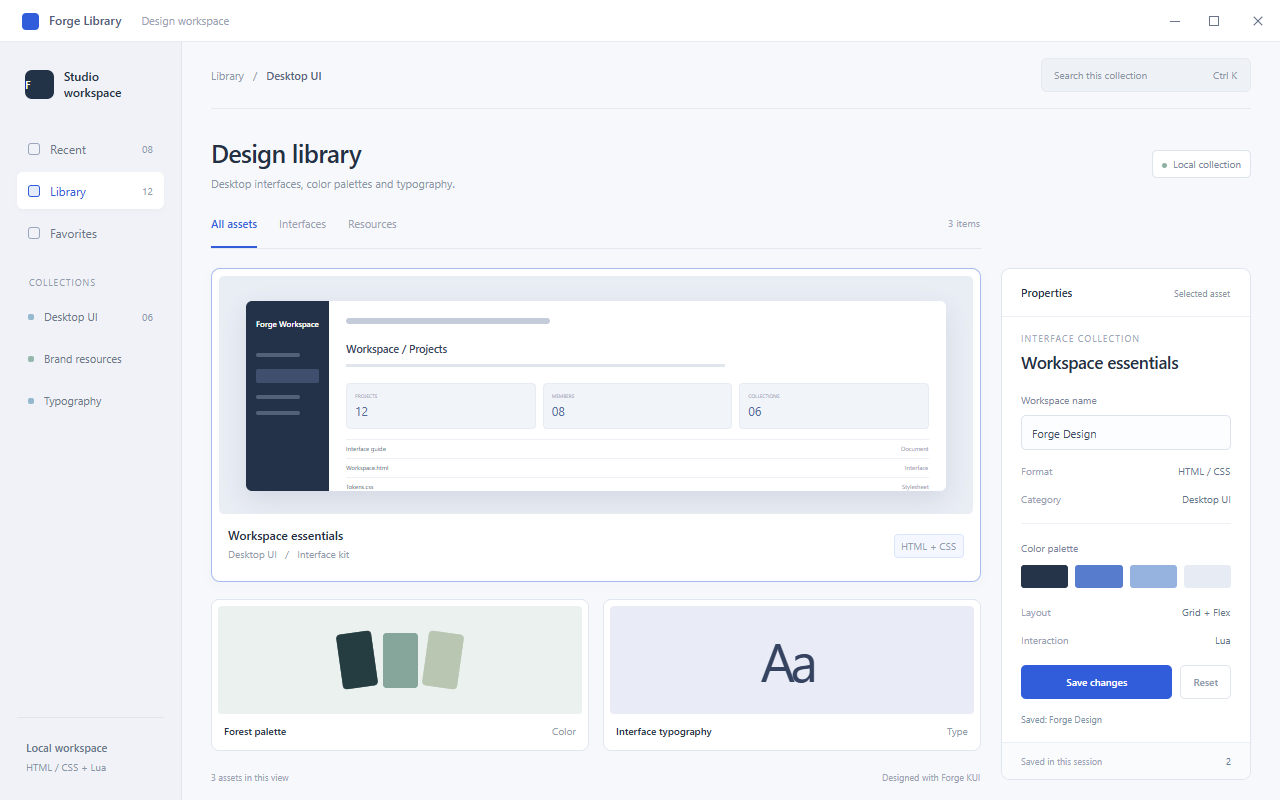
Read elements and positions
Confirm the target with kui_dom(selector="#workspace"). Read computed styles with kui_get_style; kui_box_model returns dimensions and content, padding, border and margin coordinates. Derive click positions from the target border quad center and query again after layout changes.
[
  {
    "tool": "kui_dom",
    "arguments": {
      "selector": "#workspace"
    }
  },
  {
    "tool": "kui_get_style",
    "arguments": {
      "selector": "#workspace"
    }
  },
  {
    "tool": "kui_box_model",
    "arguments": {
      "selector": "#workspace-name"
    }
  }
]
Test a style change live
kui_set_style injects a rule without replacing the stylesheet; kui_set_style_property edits one inline property. Read computed styles again and check the actual inspector width. MCP does not automatically persist this change to project files; the agent must edit the source separately.
{
  "tool": "kui_set_style",
  "arguments": {
    "selector": "#workspace",
    "css_text": "grid-template-columns: 1fr 250px; gap: 20px"
  }
}
Type, click, assert and capture
Focus with kui_click, send Ctrl+A with kui_key, type the name with kui_type, then click the current Save-button coordinates. Read #status with kui_outer_html and assert Saved: Forge Design in the test client. Capture the window with kui_screenshot. A successful command alone is not a test result; check application state and pixels.
[
  {
    "tool": "kui_key",
    "arguments": {
      "key": "a",
      "modifiers": 2
    }
  },
  {
    "tool": "kui_key",
    "arguments": {
      "key": "a",
      "event_type": "keyUp",
      "modifiers": 2
    }
  },
  {
    "tool": "kui_type",
    "arguments": {
      "text": "Forge Design"
    }
  },
  {
    "tool": "kui_outer_html",
    "arguments": {
      "selector": "#status"
    }
  },
  {
    "tool": "kui_screenshot",
    "arguments": {
      "output_path": "G:/my-project/artifacts/preferences.png"
    }
  }
]
Inspect scripts and performance
Use kui_debugger_enable, kui_script_sources and kui_breakpoint_set for Lua breakpoints. While paused, inspect kui_call_stack, kui_scope and kui_debugger_eval; continue with kui_step or kui_resume. Use kui_perf_record_start/stop/get for frame recordings and kui_perf_hot_nodes for node attribution. Follow the metrics and sampling capabilities reported by the current backend.
Something unclear?
Report an issue on this page →