How to use it
Forms, buttons, inputs, selections and popups combine KUI components with DOM behavior. Check keyboard navigation, IME, focus and accessibility on the target platform. Preserve visible focus and state differences when customizing appearance.
Integration and limits
Use VirtualList for long lists, ListView for selectable lists and TreeView for trees. Visible-row recycling reduces DOM size. Keep business data separate from row instances and notify the component when data changes.
Text inputs and checkboxes
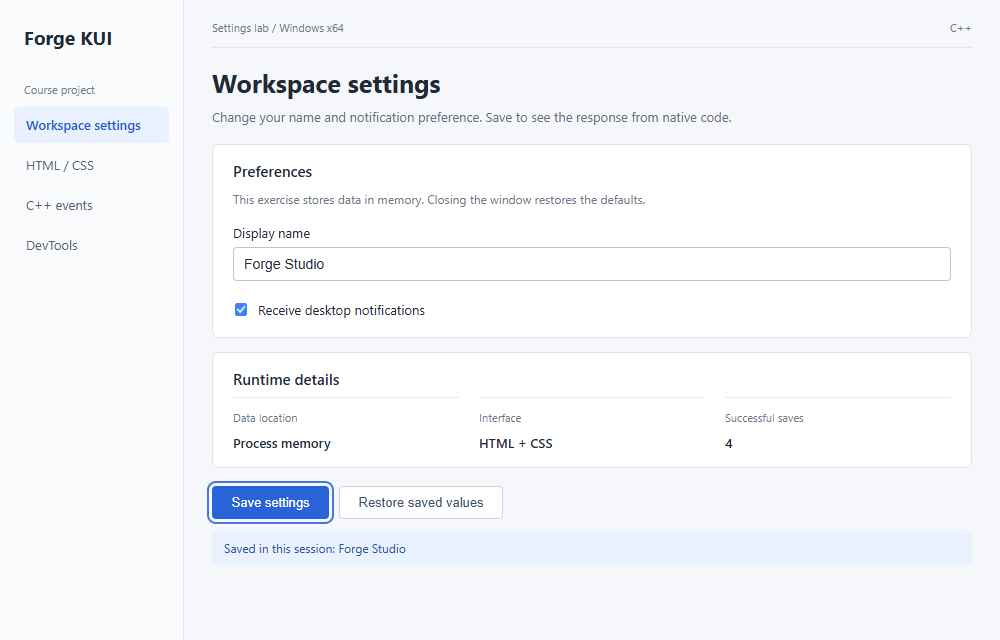
The project uses HTML form elements and a data model in C++. Invalid names preserve existing data, while restoring changes only control state. The notification option is not connected to an OS notification service.
VirtualList, ListView and TreeView
VirtualList manages visible rows and the scroll range. ListView adds selection and activation. TreeView manages expansion, collapse and the visible-node projection. Keep application data in the host model; row instances present the currently visible content.
Create a selectable list
Give the container an explicit available height. This example supplies 1,000 demo rows with a fixed height and single selection, then selects the first row. It illustrates API use rather than a performance benchmark. Keep the ListView alive while its attached container is in use.
void configureList(kui::ListView& list, kui::Element* container) {
    kui::ListViewConfig config;
    config.itemCount = 1000;
    config.itemHeight = 36;
    config.selectionMode = kui::ListViewConfig::Single;
    config.itemProvider = [](kui::u32 index) {
        kui::ListViewItem item;
        item.text = "Item " + std::to_string(index + 1);
        return item;
    };
    list.setup(container, config);
    list.select(0);
}
Update data and row content
Use setItemCount when the row count changes and refresh when existing row content changes. Updating the data array alone does not automatically rebuild rendered rows. Prefer itemHeight for uniform rows; variable-height layouts need additional height mapping.
list.setItemCount(1200);
list.refresh();
list.scrollToIndex(100);
list.clearSelection();Ordinary DOM or a virtual list
Use ordinary DOM for a few controls or a short list. Use VirtualList for many similar rows, ListView for selection or activation, and TreeView for a hierarchy. Virtualization requires separating business records from transient row nodes.
Troubleshoot virtual components
Use the symptom to narrow the cause before editing.
| Symptom | Check and action |
|---|---|
| Blank list | Check the container lookup, actual height, item count and renderItem return value. |
| Selection breaks after scrolling | Store selection in the model and rebuild row state from its index in renderItem. |
| Rows remain stale after data changes | Update the count or refresh through the component API; keep the model as the source of truth. |
Build a workspace with 10,000 records
The lesson connects data generation, visible-row rendering, selection, navigation and an inspector. 10,000 is the example size, not a performance result; inspect actual rendered rows in DevTools.
Something unclear?
Report an issue on this page →