- Before you start
- First window completed and an SDK with scripting
- What you will build
- A Lua-driven asset-library inspector
Project and target
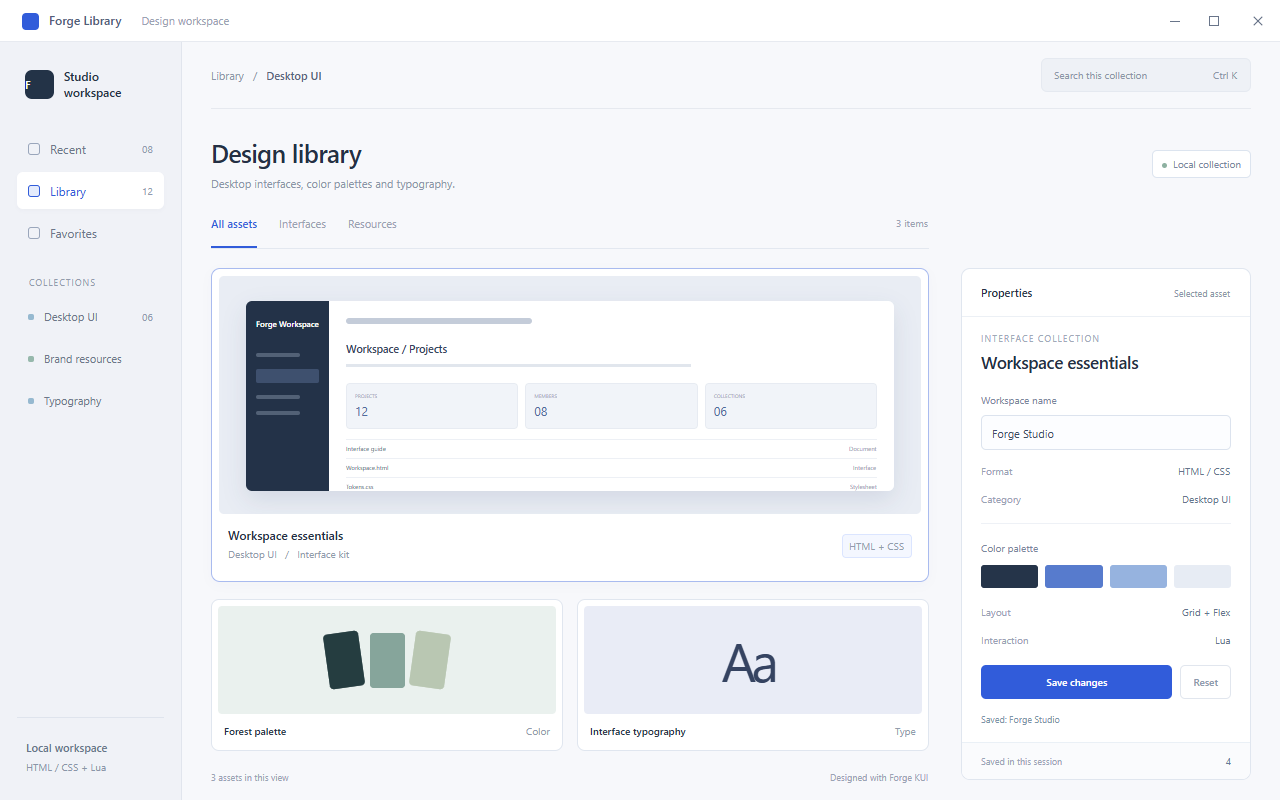
Download the Lua project. It uses the English-language Forge Library interface shown in DevTools. index.html contains HTML, CSS and Lua; main.cpp owns the window, controls and engine rather than save logic.
Build and locate the controls
Open the extracted folder and use your SDK path and build settings.
- Run the commands below to start lua_lab.exe.
- Find Workspace name, Save changes, Reset and the counter in Properties.
- Enter My Library and save; expect Saved: My Library and count 1.
- Reset restores Forge Studio while retaining the count.
$cxxStandard = Read-Host SDK-standard
cmake -S . -B build -A x64 "-DCMAKE_CXX_STANDARD=$cxxStandard" -DKui_DIR=C:/SDK/kui-cpp/cmake
cmake --build build --config Release --parallel 4
.\build\Release\lua_lab.exe
Attach and detach the engine
This excerpt comes from main.cpp. Keep both engine and bound document alive during the event loop; cleanup appears at the end of the file.
    auto script = kui::ScriptEngine::create();
    if (!script) return 4;
    script->bindDocument(doc);
    script->executeScripts();
    window->setScriptEngine(script.get());
Read current values and update text
Lua nameInput.value is the current edited value. A local variable owns the count and textContent updates feedback. No disk write occurs. Reset changes the input without resetting the count.
local nameInput = document:getElementById("workspace-name")
local status = document:getElementById("status")
local counter = document:getElementById("save-count")
local savedCount = 0

local function saveWorkspace()
  local workspaceName = nameInput.value
  local nextCount = savedCount + 1
  savedCount = nextCount
  counter.textContent = tostring(savedCount)
  status.textContent = "Saved: " .. workspaceName
end

document:getElementById("save"):addEventListener("click", saveWorkspace)
document:getElementById("reset"):addEventListener("click", function()
  nameInput.value = "Forge Studio"
  status.textContent = "Workspace name restored."
end)
Inspect a save at a breakpoint
Start with --inspect and open the Lua source in DevTools. Break inside saveWorkspace, click Save and inspect workspaceName, savedCount and nextCount. Resume and inspect DOM feedback. Runtime variable edits do not update your source file.
.\build\Release\lua_lab.exe --inspectExercise: reject blank names
Validate the name at the start of saveWorkspace and return with visible feedback on failure. Lua %s patterns are not a complete Unicode whitespace policy; this exercise handles ordinary spaces and line breaks. Keep the existing count behavior for success.
- Blank save shows an error without incrementing the count.
- Two valid saves increment the count twice.
- <h1>Test</h1> appears as text rather than a heading node.
- Restarting resets the count because there is no disk persistence.
Something unclear?
Report an issue on this page →