- Before you start
- A working first window
- What you will build
- Build a settings page for wide and narrow windows
Download and files
The project contains main.cpp, a data model, two language variants and app.css. Both HTML files use the same structure, without JavaScript. CMake embeds the HTML/CSS in a generated header; rebuild after editing the page.
- settings.zh.html / settings.en.html: structure and text.
- app.css: layout, focus and state styles.
- main.cpp: windows and events; settings_state.h: in-memory settings.
The running interface
The sidebar provides course navigation. The main area contains preferences, runtime details and actions. The C++ callback in the next lesson handles saving. This project stores settings only in memory, resetting them on exit. The notification checkbox demonstrates preference state and does not send OS notifications.
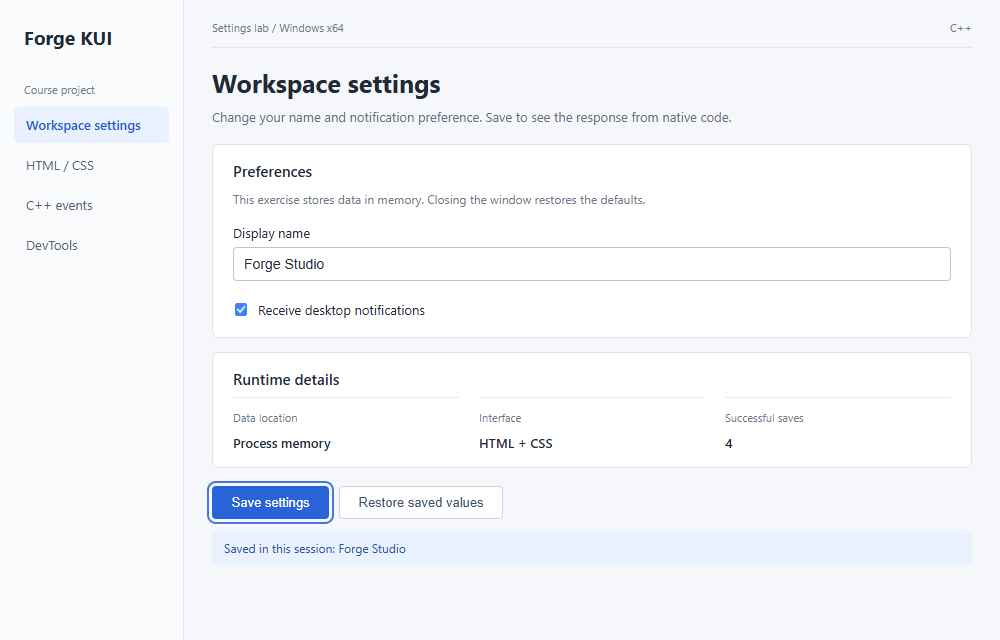
Sidebar and main area
The app uses Flex for the sidebar and workspace. The sidebar has a fixed width and the workspace uses flex:1. min-width:0 allows the main area to shrink. Form panels share the same spacing and border rules.
.app { display: flex; min-height: 100vh; }
.sidebar { width: 184px; flex-shrink: 0; background: #fafbfc; border-right: 1px solid #e2e7ee; padding: 24px 14px; }
.wordmark { font-size: 19px; font-weight: 700; margin: 0 10px 32px; }
.sidebar-label { font-size: 11px; color: #6c788a; margin: 0 10px 10px; }
.nav-item { padding: 9px 12px; font-size: 13px; line-height: 1.4; margin-bottom: 4px; border-radius: 5px; color: #536174; }
.active { background: #e9f0ff; color: #235bcd; font-weight: 600; }
.workspace { flex: 1; min-width: 0; padding: 20px 28px; }
Narrow windows
Below 760px the layout reduces padding and stacks runtime details. Below 560px the app stacks vertically and the sidebar keeps only the brand. Try changing the breakpoint to 640px and rebuild to inspect the change. Consult the CSS guide for property support.
@media(max-width: 760px) {
 .sidebar { width: 152px; padding: 20px 10px; }
 .wordmark { font-size: 17px; }
 .workspace { padding: 18px; }
 .panel { padding: 16px; }
 .details { flex-direction: column; gap: 12px; }
}
@media(max-width: 560px) {
 .app { flex-direction: column; }
 .sidebar { width: 100%; padding: 14px 18px; }
 .wordmark { margin: 0; }
 .sidebar-label, .nav-item { display: none; }
 .workspace { padding: 18px; }
 .actions { flex-wrap: wrap; }
}
Build and exercise
After running the Chinese version, use --english to open the English page. Resize the window and use Tab and Shift+Tab to reach the text field, checkbox and buttons. Check that labels, focus and status remain visible.
$cxxStandard = Read-Host SDK-standard
cmake -S . -B build -A x64 "-DCMAKE_CXX_STANDARD=$cxxStandard" -DKui_DIR=G:/SDK/kui/cmake
cmake --build build --config Release --parallel 4
ctest --test-dir build -C Release --output-on-failure
.\build\Release\settings_lab.exe
.\build\Release\settings_lab.exe --englishPractice and acceptance
Use these actions to check completion; there is no need to copy the same code into another project.
- Add a help line below the name input without changing its ID.
- Reduce workspace padding and check status and button alignment.
- Run default, --compact and --english modes and inspect text and focus.
Something unclear?
Report an issue on this page →